
Bulk download your Pinterest boards, profiles and searches.
A Chrome extension that reads the board you are already looking at and writes every pin to your own computer. No Pinterest password, no upload to anyone's server.
You start here
A board, a profile or a search
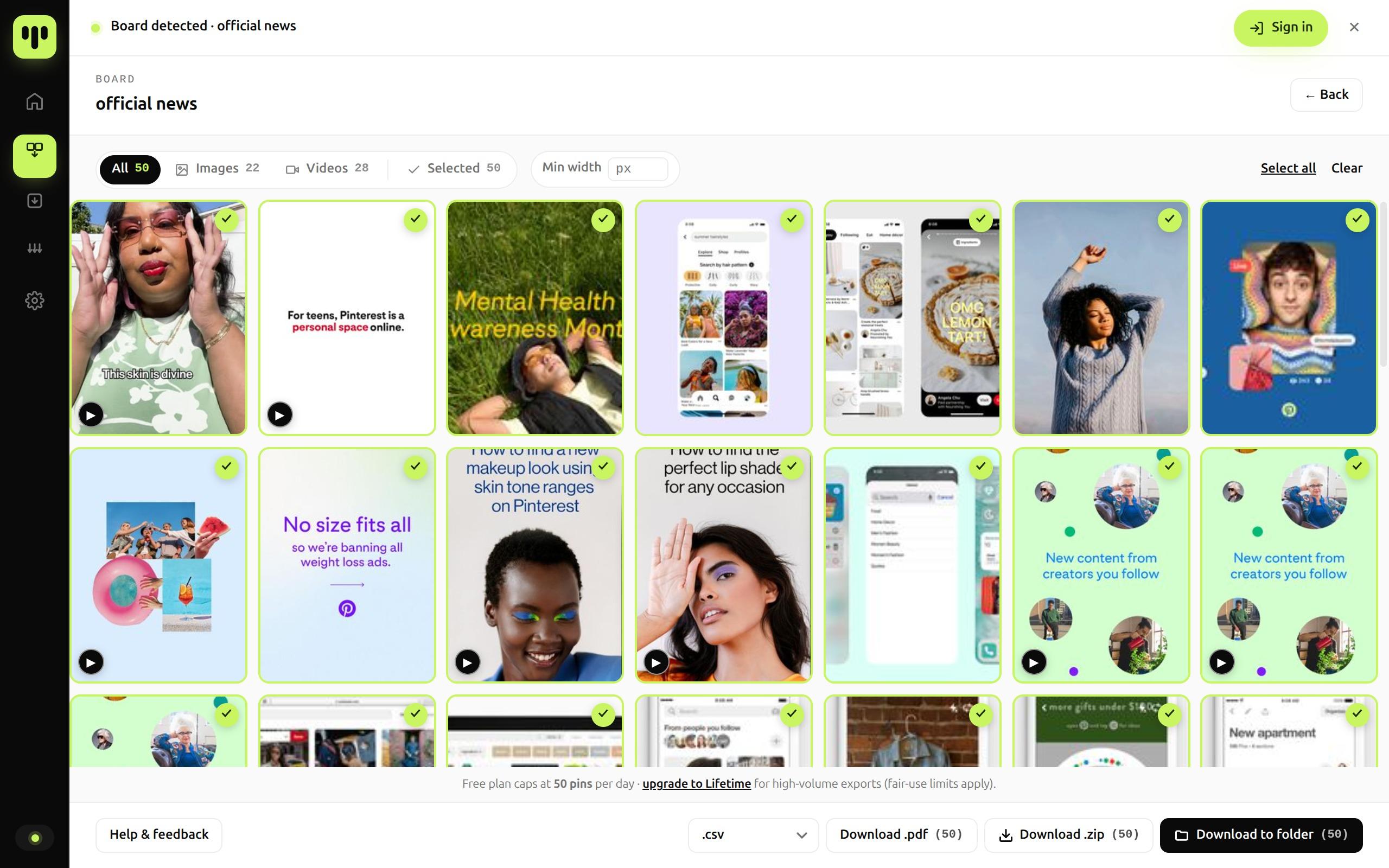
You end up here
Files in your own folder
Download the Pinterest surface you're already on
BulkoPin reads what is already on your screen, from an entire board down to a single saved pin. No logins, no developer setup, no Pinterest credentials.
Fits the tools you already use
Three clicks between you and an entire board, profile or search.
From install to a fully archived board, profile or search result on your own drive, with no Pinterest credentials and no manual right-clicking.
Chrome Web Store · 10s install
Pin the extension
Install BulkoPin from the Chrome Web Store in 10 seconds. The icon docks into your toolbar and no Pinterest login is required.
Boards · Profiles · Search
Open a board
Browse to a Pinterest board, profile or search query. We auto-detect and scan every pin, including the ones that only appear as you keep scrolling.
ZIP · PDF · CSV
Export in one click
Pick ZIP, PDF contact sheet or CSV metadata. Every pin lands on disk at original resolution within seconds.
Built for the size your boards actually are.
Parallel Download covers several sources at once, and every request still goes through the same pacing as a single export.
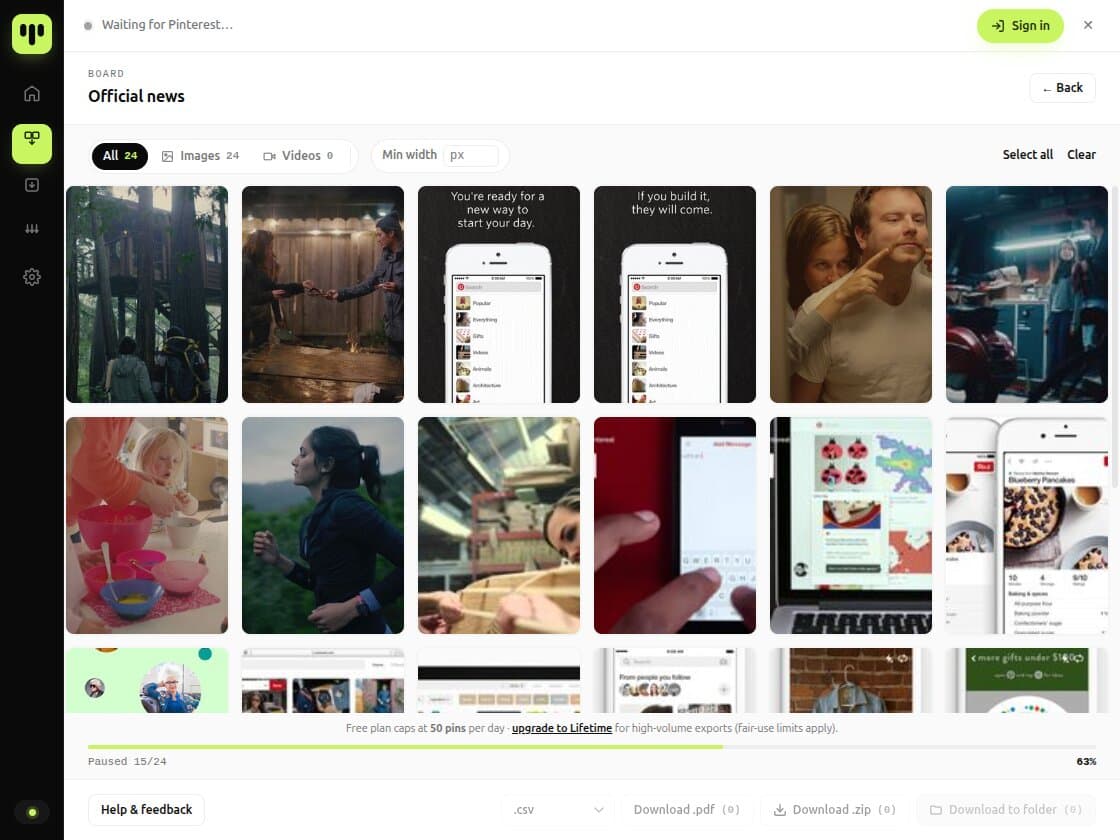
Track every export and stay inside your quota
A built-in dashboard shows what you've backed up, when it ran, and how much of today's export quota is still free.
- Export history per boardEvery board you've exported stays listed with its file list, so you can reopen the original source instead of hunting for it.
- Live quota trackingSee exactly how many pins your current plan still covers.
Built for the way you actually collect.
For designers building mood boards
Pull every reference from a board, a profile you follow or a saved search. It arrives organized and ready before your next pitch.
For architects archiving inspiration
Export whole boards, profiles and topic searches into a folder structure you can actually navigate later.
For fashion and product research
Image and video pins download separately by default, so trend research doesn't get buried in mixed-format folders.
For agencies managing multiple accounts
Run the same export process across every client board or competitor profile you track, with Parallel Download when you're covering several at once.
For creators collecting references fast
Grab the video and image pins you need onto your own drive in seconds. No screenshotting, no manual saves.
For researchers tracking sources weekly
Re-scan the same boards or profiles whenever they change. Every run is logged in your download history, so you can see what you pulled and when.
Built to archive whole boards, profiles and searches.
Plenty of Pinterest downloaders stop at a single link, and some route your images through their own servers. BulkoPin runs locally inside your browser and backs up in one pass whole boards, creator profiles and search results you can already see.
- One-click bulk export
- Original-resolution images
- Local-first, zero credentials
| Capability | BulkoPin | Six tools reviewed |
|---|---|---|
| Works on search results | Yes | Rare |
| Asks for your Pinterest password | No | Rare |
| Files built locally in your browser | Yes | Varies |
| CSV metadata export | Yes | Rare |
| Parallel Download (multiple sources at once) | Lifetime | Rare |
| Daily export limit | Removed on Lifetime | Varies |
| Chrome extension workflow | Yes | Varies |
| Independent, not affiliated with Pinterest | Yes | Varies |
| Privacy boundaries published | Yes, in Privacy & Terms | Often unclear |
Works on search results
BulkoPinYesTypicalRareAsks for your Pinterest password
BulkoPinNoTypicalRareFiles built locally in your browser
BulkoPinYesTypicalVariesCSV metadata export
BulkoPinYesTypicalRareParallel Download (multiple sources at once)
BulkoPinLifetimeTypicalRareDaily export limit
BulkoPinRemoved on LifetimeTypicalVariesChrome extension workflow
BulkoPinYesTypicalVariesIndependent, not affiliated with Pinterest
BulkoPinYesTypicalVariesPrivacy boundaries published
BulkoPinYes, in Privacy & TermsTypicalOften unclear
Unlock Your Archive
Start free. Upgrade only when you outgrow it. No Pinterest credentials, no hidden costs.
- ZIP export
- Chrome, Edge, Brave, Opera extension
Card payments are processed securely by a licensed payment institution. You buy directly from BulkoPin, and we never see or store your card details.
Pay once, own your exports forever. The $14.99 launch price is applied automatically at checkout.
- Everything unlocked
- One payment, no recurring charges
- All future features included
- Early-adopter pricing, locked in
- Priority support
One payment, nothing to cancel
Lifetime is a single one-time payment with a 14-day, evidence-based refund guarantee. There is no subscription behind it to manage.
Questions, answered straight.
No legalese, no fine-print escape hatches. Can't find what you need? Write us at support@bulkopin.com.
Is it safe to use with my Pinterest account?
Yes. BulkoPin runs entirely in your browser and never asks for your Pinterest password. It only reads the pins your own logged-in Pinterest tab already displays to you.Is BulkoPin affiliated with Pinterest?
No. BulkoPin is an independent Chrome extension, not affiliated with, endorsed by or sponsored by Pinterest. All trademarks belong to their respective owners.Which boards, profiles and searches can I export?
Any public board, your own private boards, creator profiles and search result pages you can access in your browser. If you can see it on Pinterest while logged in, BulkoPin can back it up.What does the free plan include?
Up to 50 downloads in any rolling 24 hours, as ZIP files, at the highest resolution Pinterest serves to your browser. Each image or video counts as one download, including individual frames of a carousel. No credit card required. CSV metadata is included too; the PDF contact sheet and Parallel Download are part of Lifetime.Are my images uploaded to BulkoPin's servers?
No. Exports are local-first: image bytes are downloaded straight from Pinterest's own servers to your machine and packaged in your browser. We never relay or store your image files.Does Parallel Download put my Pinterest account at risk?
No. Downloading from several boards, profiles or searches at once still runs through the same request pacing as a single export. BulkoPin never bypasses Pinterest's rate limits or access controls to go faster.How large can a board be?
The largest real board we have walked end to end held 41,367 pins in a single run. A repeatable test against a stand-in goes to 50,000. Neither is a promise about yours. The scan keeps going to the bottom of the page and keeps counting as new pins load. Lifetime removes the daily cap under our acceptable-use policy; the free plan is capped at 50 downloads in any rolling 24 hours.Is there anything to cancel?
No. Lifetime is a single one-time payment, not a subscription. There's nothing recurring to cancel, and it comes with a 14-day, evidence-based refund guarantee if BulkoPin doesn't work as described.
Ready to download your Pinterest boards, profiles and searches?
Set up the extension in 10 seconds. Everything you export stays safe, local, and yours to keep.