Skip to content

Features

Everything it does, and everything it won't.

One extension with a narrow job: turn the Pinterest boards, profiles and searches you already have open into files on your own disk, for a moodboard, a client deck, a research archive or a collection you simply want to keep. This page is the whole of it.

  • 3Sources it readsBoards, profiles and search results. Anything else is out of scope.
  • 6Export formatsChosen in the export row, or set once in the extension's settings.
  • 50Free pins per dayCounted over a rolling 24-hour window. There is no midnight reset.
  • 0Files kept on our serversArchives are assembled in your browser and written straight to your disk.

One screen does the whole job.

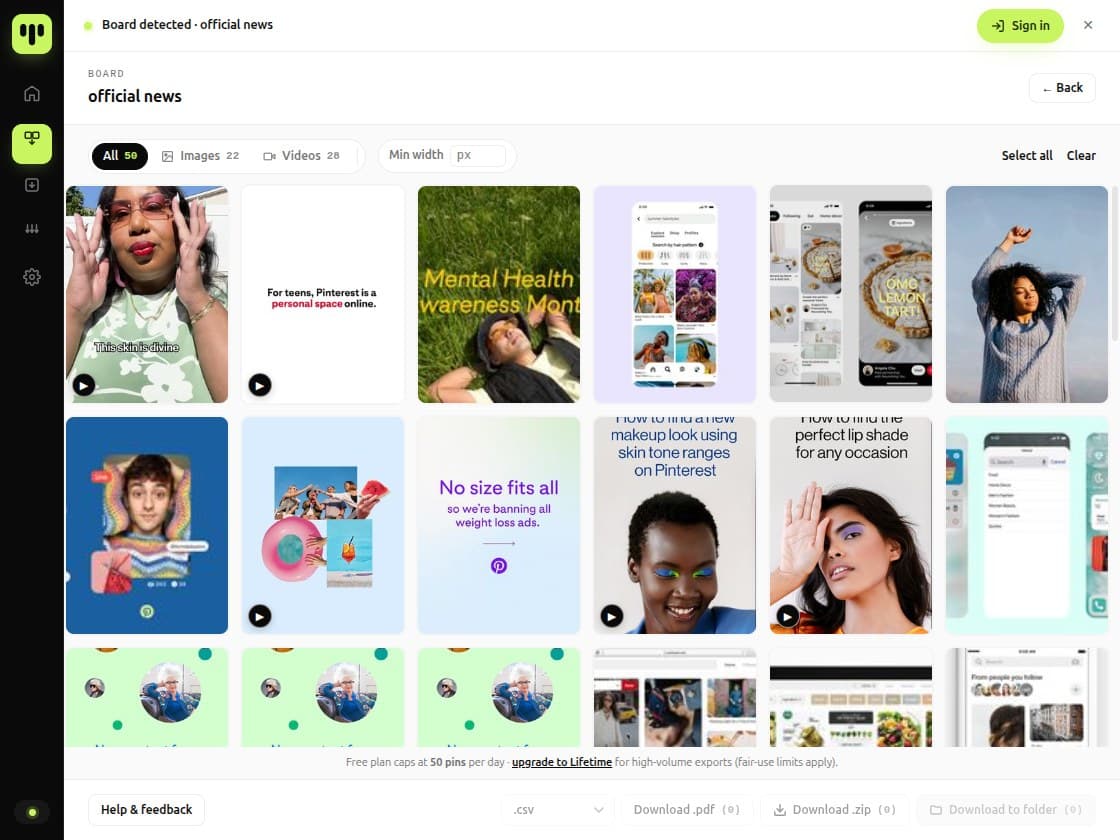
No dashboard and no upload step. The extension opens over the page you are already on, counts what it can see, and hands you the export row along the bottom.

The BulkoPin extension open on a Pinterest board, showing the pin grid with the media filters and selection controls above it.
It separates images from video while it scans, and tells you how many of each it found before a single file is fetched.
Nothing is downloaded until you say so: the whole board, or only the pins you ticked.

In the bar above the grid

  • Images / Videos filter
  • Minimum width in pixels
  • Select all · Clear

The free ceiling is printed along the bottom of the window, inside the product itself, not only on a marketing page.

Three places a run can start.

The extension reads the tab you are already on and names the surface it recognises. From there, every run is the same handful of steps.

  • Board

    type-specimens

    Every pin on the board, including the thousands you would otherwise have to scroll past by hand.

  • Profile

    studio-archive

    Everything a profile has pinned, your own included, without opening each board in turn.

  • Search

    brutalist stair detail

    A result set kept the way it stood when you ran it, before the feed moves on.

A surface it does not recognise is refused outright rather than half-read.

Six formats, one selection.

Choose the pins once. The row along the bottom of the window turns that same selection into whichever of these you need. None of them is a different workflow.

  • Metadata (CSV)
  • Download .pdf
  • Download .zip
  • Download to folder
The export row, as it sits at the bottom of the window.
  • Folder
  • ZIP
  • PDF
  • CSV
  • JSON
  • Markdown

Folder session

Files arrive one at a time in your Downloads folder, sorted as they go. Nothing is packed, so a long run is already usable while the rest of it is still arriving.

The folders it builds

Downloads/
└── BulkoPin/
    └── <board or profile>/
        ├── Image/
        └── Video/

ZIP archive

The same tree, closed into a single file. A CSV of the metadata can travel inside the archive with it.

PDF contact sheet

Lifetime

A printable gallery with a thumbnail, title and source link per pin, for the reviews that happen away from a screen.

Metadata on its own

Every plan

Titles, descriptions, source URLs and board paths with no images at all, as CSV, JSON or Markdown. None of the three needs a licence, though the free plan's Markdown table carries three columns where Lifetime carries the full set.

Columns it writes

  • index
  • pin_id
  • title
  • description
  • source_url
  • canonical_pin_url

The parts you set once.

Every setting lives in the extension, next to the thing it changes, and none of them needs an account. These four decide what actually lands on your disk.

Image quality

  • Originals (best)Default
  • 736×
  • 564×

Originals is the largest variant Pinterest serves your session. Where one is missing, the run falls back on its own instead of stopping.

File naming

  • Organized (title + short id)Default
  • Clean (title only)
  • Date based
  • Original-ish (index + title)
  • Research (title + id + quality)
  • Custom

How the files in a folder session are named, inside the folders above. Custom takes a pattern of your own.

Concurrent file downloads

5of 1 to 10

How many files are in flight at once. More is faster and heavier on your connection, and the engine eases off by itself when Pinterest asks it to.

Desktop notifications

On

A ping when a long run finishes, so you do not have to sit and watch it.

What a licence changes.

Most of this page is the same on both plans. The difference is short, and it is read here from the same capability table the software enforces.

Daily export volume

Free

50

pins per rolling 24 hours

Lifetime

No cap

on how much you export in a day

The engine has been measured end to end at 50,000 pins in a single run. Fair use is a published policy, not a limit the software applies.

On both plans

  • Boards, profiles and search results
  • ZIP archive
  • Download to folder
  • CSV, JSON and Markdown metadata
  • Images, video and GIF
  • Highest resolution Pinterest serves

Only on Lifetime

  • PDF contact sheet
  • Parallel Download
  • Export history kept across devices
  • Markdown metadata with every column
  • metadata.json written inside the archive

What BulkoPin doesn't do.

Plain language about the limits, because every responsible tool has them.

  • We never ask for your Pinterest password, and nothing about your Pinterest session ever leaves your device.
  • We don't run background or continuous automation. Every export is user-initiated.
  • We don't bypass Pinterest's access controls or rate limits.
  • We don't claim to recover deleted pins or unlock private boards you can't access.
  • We don't sell your usage data or run advertising trackers.
  • We don't promise specific resolutions Pinterest doesn't serve to your browser.
  • We don't transfer any rights. Copyright in what you export stays with the creator.

Ready to download a board, a profile or a search?

Install the extension, open a board, and everything on this page is already there. Free covers 50 pins a day; Lifetime is a one-time payment and removes the daily cap.