
Pinterest downloader
Paste one pin link and get the full-resolution file Pinterest publishes, not the smaller preview you see in the feed. No account, no watermark, nothing to install.
What the field takes
- Full link
- pinterest.com/pin/…
- Short link
- pin.it/…
- Pin types
- Image, video, GIF
- Not here
- Boards, profiles, search results
Where the file actually comes from.
Most download sites will not tell you this. Here is the whole path, in order, and there is nothing else in it.
The pin's public page
We load the same public page your browser would load and read the media out of it. No Pinterest login, no cookies and nothing from an account, because there is no account on either side of this.
Our resolver
It checks the link really is a pin, follows a pin.it short link if there is one, and works out whether the pin is an image, a video or a GIF. For photos it takes the originals file, which is the largest copy Pinterest publishes, rather than the downscaled one the feed shows you.
The step that names your file
The download button points at our relay, not at Pinterest. It forwards the bytes straight through and gives the file a readable name. It keeps no copy and writes nothing to disk. It exists because a browser cannot rename or reliably save a file served from another domain.
Your device
The file arrives exactly as Pinterest published it: its own format and its own resolution, not the JPEG the feed shows you. No watermark, and no second round of compression.
What gets recorded
Two things, both for abuse protection: the address a lookup came from, and whether it worked. No pin history, no account and no copy of your file. All of it is listed in the Privacy Policy.
The one limit
Lookups are capped at 20 in 60 seconds from a single address. That is an abuse guard rather than a quota: it is attached to no account, it clears continuously, and ordinary use never reaches it.
Image, video and GIF do not behave the same.
On a board they sit next to each other and look like three versions of one thing. They are stored differently and they fail differently. This is what each one does here, and what changes when the extension is the one reading it.
Image
A still photo pin.
On this page
WorksResolves reliably. The link points at the originals file, which is the largest copy Pinterest publishes. If the upload was small the download is small too: nothing here invents pixels that were never there.
With the extension
WorksThe same file, and every image on a board in one pass.
Video
A pin whose media is a video file.
On this page
SometimesWorks when the public page exposes a single MP4. Some videos are published only as an adaptive stream, which is many small pieces rather than one file, so there is nothing to save. You get a plain message instead of a broken download.
With the extension
WorksReads the video through your own Pinterest session, which usually reaches the stream-only ones as well.
GIF
An animated pin.
On this page
WorksComes back as the .gif file itself, still animated. Detection is automatic, so there is nothing to switch on and no still frame to end up with by accident.
With the extension
WorksThe same, in bulk.
Carousels
A pin with several images is one link with several slots behind it. This page stops and tells you how many it found rather than guessing which one you meant. The extension can take all of them.
Private and login-gated pins
A pin Pinterest will not show a signed-out visitor cannot be read from a public page, so this tool cannot reach it. The extension can, because it works inside the session you are already signed in to.
One pin here. A whole board there.
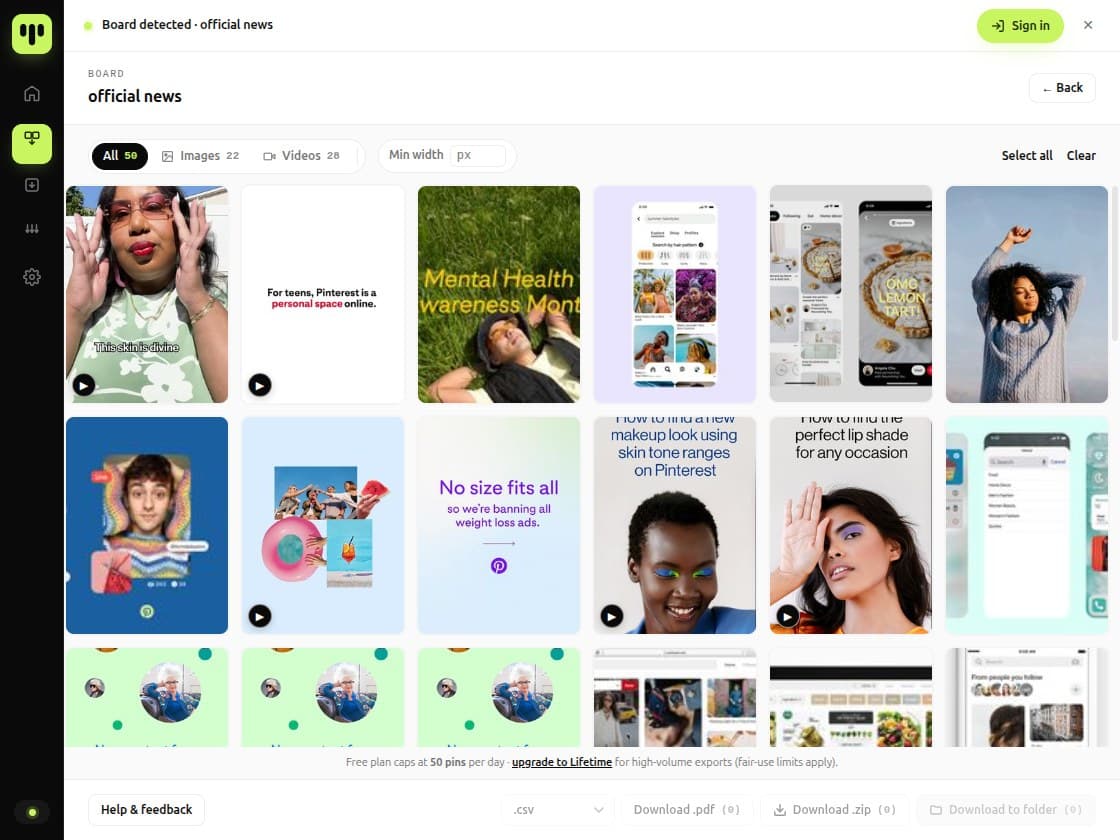
This page takes one pin at a time. The BulkoPin extension reads a board, profile or search result you already have open in your own Pinterest session and saves the whole thing to a folder on your computer.
This page
- One pin per link
- No install, no account, nothing to set up
- Reads the pin's public page and nothing else
- Reaches whatever a signed-out visitor can see
The BulkoPin extension
- Whole boards, profiles and search results
- Up to 50,000 pins in a single run
- Runs inside your own Pinterest session, so private and login-gated pins are reachable
- Straight into a folder, or packed as a ZIP
- Add to ChromeOpens the Chrome Web Store in a new tab
- What the extension can and cannot reach
What each side asks for.
This page charges nothing and asks for nothing. The extension needs a free account, because volume has to be counted against something.
This page
Asks for
Nothing
Volume
No daily limit
The detail
No account, no email address and no Pinterest password. The only ceiling is the abuse guard above: 20 lookups in 60 seconds from one address.
Extension, free
Asks for
A free BulkoPin account
Volume
50 pins per rolling 24 hours
The detail
The window measures backwards from each export rather than resetting at midnight. Boards, profiles, search results, ZIP, direct-to-folder, CSV metadata, video, GIF and full resolution are all included.
Lifetime
Asks for
One payment of $14.99
Normally $19.99
Volume
No daily capThe detail
Adds the PDF contact sheet, Parallel Download and export history kept across devices. Nothing moves the other way: everything in the free plan stays in the free plan.
Questions, answered.
Do I need to install anything?
No. Paste a link at the top of this page and the preview and the download link appear right there. The BulkoPin extension is a separate tool, and you only need it for whole boards, profiles or search results.Is the image I get the full size?
Yes, as far as Pinterest publishes it. Pinterest serves several sizes of the same photo and the one in the feed is a downscaled preview; the download link points at the originals file instead. If the pinner uploaded a small image then the original is small, and nothing here invents pixels that were never there.Does the file pass through your servers?
The bytes do, and nothing else. The download link points at a step of ours that forwards the file straight to you and gives it a readable name. It keeps no copy and writes nothing to disk. It exists because a browser cannot rename or reliably save a file served from another domain.What do you record when I use this?
The address a lookup came from and whether it succeeded, both so that one address cannot hammer the resolver. No pin history, no account and no copy of your file. The Privacy Policy lists it.Can I download videos and GIFs?
Both are detected automatically and neither is behind a payment. GIFs come back animated. Videos work when the pin's public page exposes a single MP4 file; some are published only as an adaptive stream, which cannot be saved as one file this way, and you get a plain message rather than a broken download. The BulkoPin extension reaches those through your own Pinterest session.How do I download a whole board or profile?
Not from this page, which takes one link at a time on purpose. The BulkoPin extension reads a board, profile or search result you already have open in Pinterest and saves the whole thing in one run.Is there a limit on how much I can use this?
There is no daily quota, and no account for one to be attached to. There is an abuse guard on the resolver, 20 lookups in 60 seconds from a single address, so that nobody can hammer it. Ordinary use does not come close.Who owns the image I download?
Whoever created it. Downloading a copy does not transfer any rights, and BulkoPin makes no claim to your file either, since we never hold one. Keep downloads for your own reference, and get permission before you republish or sell someone else's work.Is BulkoPin affiliated with Pinterest?
No. BulkoPin is an independent download tool and is not affiliated with, endorsed by, or sponsored by Pinterest, Inc.
Read next
Four guides that go further than a page like this one can.